Dental Clinic Booking App Development
Dental clinic booking app development should fit patient booking into the clinic's real front-desk workflow.
Jun 30, 2026
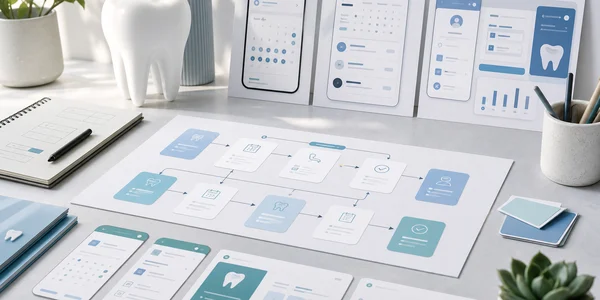
Table of Contents
- Dental clinic booking app development starts with operations
- Start with the clinic day, not a calendar screen
- Dental clinic booking app development should keep the front desk in control
- Make the patient flow simple without flattening the clinic
- Give owners product visibility without overclaiming
- What Calendy taught us about dental booking products
- Architecture choices for dental clinic booking app development
- How to scope a useful first release
- If you are building dental booking software
Dental clinic booking app development starts with operations
Dental clinic booking app development is easy to underestimate if the product is framed as a public calendar. A clinic does not run on empty slots alone. It runs on treatment categories, practitioner availability, room capacity, front-desk judgement, patient questions, existing systems, and the daily responsibility of keeping the schedule coherent.
That is why a useful booking product for a dental clinic should not begin with a generic screen list. It should begin with how the clinic already works. Which appointments are routine enough for patients to book themselves? Which ones still need staff review? Which parts of the day should stay protected? What does the front desk need to see before the booking becomes part of the working calendar?
For Ascenta, this is the difference between shipping a calendar interface and building software that can actually live inside a clinic. The patient experience has to feel clear and modern, but the operational side has to respect the people already managing the day. A strong product makes routine booking easier without pretending the software should replace the team.
Start with the clinic day, not a calendar screen
Most early product briefs for appointment software sound similar: booking page, calendar, services, staff, notifications, dashboard. Those labels are useful, but they do not explain the workflow. Dental clinic booking app development needs a more concrete starting point: follow one appointment from patient intent to a slot the clinic can trust.
The patient may want a routine appointment. The product needs to present a clear set of options without turning clinical language into a confusing menu. The selected appointment type has a duration and may be connected to specific practitioners or rooms. The clinic may prefer certain appointment types in certain parts of the day. The front desk may need a clear view of what was booked, when it was booked, and what action, if any, is required.
When that chain is mapped first, the product decisions become sharper. Availability is no longer just a list of open times. It is the result of clinic rules, staff schedules, appointment categories, and operational judgement. The public flow is no longer just a form. It is the patient's guided path into a real schedule the clinic still owns.
This approach also protects the build from feature sprawl. A product team can ask whether each feature improves the complete appointment path or merely makes the sales deck look wider. If the first version cannot reliably move a routine request into the right part of the clinic day, adding more surface area will not create a better product. It will create more places for the workflow to break.
Dental clinic booking app development should keep the front desk in control
In a dental clinic, the front desk is not an obstacle to automation. It is part of the operating system of the business. Staff understand which requests are straightforward, which ones need context, and which schedule patterns make the day manageable. Good software should give them leverage, not remove them from the process.
That principle changes the shape of the product. Patient self-booking should sit inside rules the clinic controls. The team should be able to define appointment types, working hours, practitioner availability, and the public options patients can choose. The front desk should have a clear operational calendar, not a separate pile of patient submissions that have to be reconciled manually.
Control also means reversibility and clarity. Staff need to understand why a patient was offered a time. They need appointment details in a predictable place. They need to see the day without decoding a generic calendar that treats every visit as identical. When a product is designed around clinic responsibility, the interface becomes less dramatic and more trustworthy.
This is where custom software can create real advantage. The goal is not to invent a complicated system for its own sake. The goal is to encode the clinic's practical rules so the team spends less attention translating routine requests. Patients get a simpler path. The front desk keeps ownership of the day.
Make the patient flow simple without flattening the clinic
The patient side of the product should feel lighter than the operation behind it. A patient should not need to understand every staffing rule or internal category. They should understand what they are booking, which times are available, and what happens after they submit the request.
That is a design challenge, not just a UI challenge. The public flow needs plain language, a small number of decisions, and realistic availability. If the product asks too much, patients go back to calling. If it asks too little, the clinic receives bookings that require extra correction. The right path narrows patient choices using real clinic rules while keeping the experience calm.
Confirmation is part of that experience. Calendy, for example, sends a confirmation email with a calendar .ics file the patient can add to their own calendar app. Eligible bookings can also receive automatic appointment reminder emails when the business enables them and a recipient email address is available. The booking record, business-sent reminder, and any alert configured in the patient's own calendar are distinct parts of that communication journey.
For dental software, the same discipline matters. Do not promise capabilities just because the market expects a long feature list. Build the patient journey around what the product actually does today. Clear booking, clear confirmation, and clear clinic ownership are stronger than a larger promise the team cannot confidently support.
Give owners product visibility without overclaiming
Clinic owners and operators often want more than a calendar. They want to understand how the booking product is being used. That kind of visibility can be valuable, but it should be framed carefully. The product can show business and product patterns: booking volume, common appointment categories, availability usage, and where patients move through the flow. It should not turn ordinary product analytics into medical, legal, or performance claims.
This is an important distinction in dental clinic booking app development. A dashboard should help an owner inspect the operation and make business decisions. It should not imply outcomes the software is not designed or qualified to measure. The most useful analytics are often modest: where demand appears, where the calendar has friction, which appointment types need clearer public language, and whether the front desk has enough context to manage the day.
Ascenta designs these surfaces around the questions an operator can act on. The point is not to decorate the product with charts. The point is to make the booking system legible, which is the central idea behind giving owners visibility instead of more features. A clinic owner should be able to see whether the product is helping routine demand move into the schedule cleanly, while the team still controls the operational reality behind each slot.
What Calendy taught us about dental booking products
Calendy is useful proof of Ascenta's product-building thinking because it was built for appointment-based businesses where booking has to serve both the public user and the operator. The product work reinforced a simple lesson: self-booking is only valuable when it fits the business model around it.
For dental clinics, that means patient-friendly booking cannot be treated as a consumer app floating above the clinic. It has to connect to appointment types, practitioner schedules, staff responsibilities, and the owner's need for clarity. The patient may only see a few simple steps. The clinic needs the rules that make those steps safe to offer.
The paired Calendy article looks at online booking for dental clinics from the product side: routine bookings become easier for patients while the clinic front desk remains in control of the day. The Ascenta perspective is the build lesson underneath that: software succeeds when the workflow model is designed before the calendar screen.
That is why we treat Calendy as a case study in product judgement, not as the only answer. A clinic considering custom software may need a dedicated product, a patient-facing booking layer, an internal operations tool, or a staged build that starts with one narrow workflow. The right decision depends on the clinic's operations, not on copying a generic booking interface.
Architecture choices for dental clinic booking app development
The early technical model shapes how far the product can go. Appointment type should be structured data, not a text note. Practitioner availability should be represented in a way the product can calculate from. Public booking rules should be separate from private staff controls. The clinic should own its records and operational settings in a clean data model.
Permissions also matter early. A clinic owner, front-desk staff member, and practitioner may need different access and different default views. If every user sees the same administrative surface, the product becomes heavy and trust suffers. If permissions are an afterthought, later growth becomes risky and expensive.
Content and acquisition surfaces are part of the build too. A booking product needs stable public URLs, fast pages, metadata, social preview images, search-friendly content, and a clear product story. For a clinic or dental software company, the product and its market explanation cannot be separated forever. The same architecture that makes the tool usable should also make it understandable.
Finally, the system should preserve future optionality without pretending the first release needs every future module. Good architecture means the core relationships are explicit enough to extend later. It does not mean shipping a swollen first version. The first goal is a trustworthy end-to-end workflow.
How to scope a useful first release
A strong first release for dental clinic booking software should prove one complete path. Define a manageable set of routine appointment types. Connect them to practitioner availability and clinic rules. Let a patient select an appropriate option and time. Put the booking into a calendar the front desk can manage. Send a clear confirmation. Give the owner enough product visibility to understand adoption and operational fit.
That scope is intentionally practical. It does not try to rebuild every system inside the clinic. It does not assume every appointment should be self-booked. It gives the clinic a controlled way to test whether patients will use a simpler booking flow and whether staff can trust the result.
After launch, the best product discovery comes from real behavior. Where does the front desk still compensate? Which appointment labels confuse patients? Which rules need to be more specific? Which views help the owner understand product usage? Those answers are more valuable than hypothetical feature requests because they come from the live operating model.
For a clinic owner or operator, the build partner matters here. You do not only need someone who can implement screens. You need a team that can translate clinic workflow into product structure, protect the first release from unnecessary scope, and keep the patient experience polished without weakening staff control.
If you are building dental booking software
- Begin with the clinic's real appointment workflow, not a generic calendar interface.
- Decide which appointment types are suitable for patient self-booking and which should remain staff-led.
- Design front-desk control as a core product requirement, not a fallback.
- Keep the patient flow simple while letting clinic rules shape the available choices.
- Use analytics for product and business visibility, not unsupported medical or legal claims.
- Scope the first release around one reliable end-to-end booking path.
Ascenta designs booking software around real clinic operations, not generic calendar screens. Planning dental clinic booking app development or a patient-facing operations tool of your own? Get in touch with Ascenta.